How to Turn an Online Article Into a Framed Newspaper Print
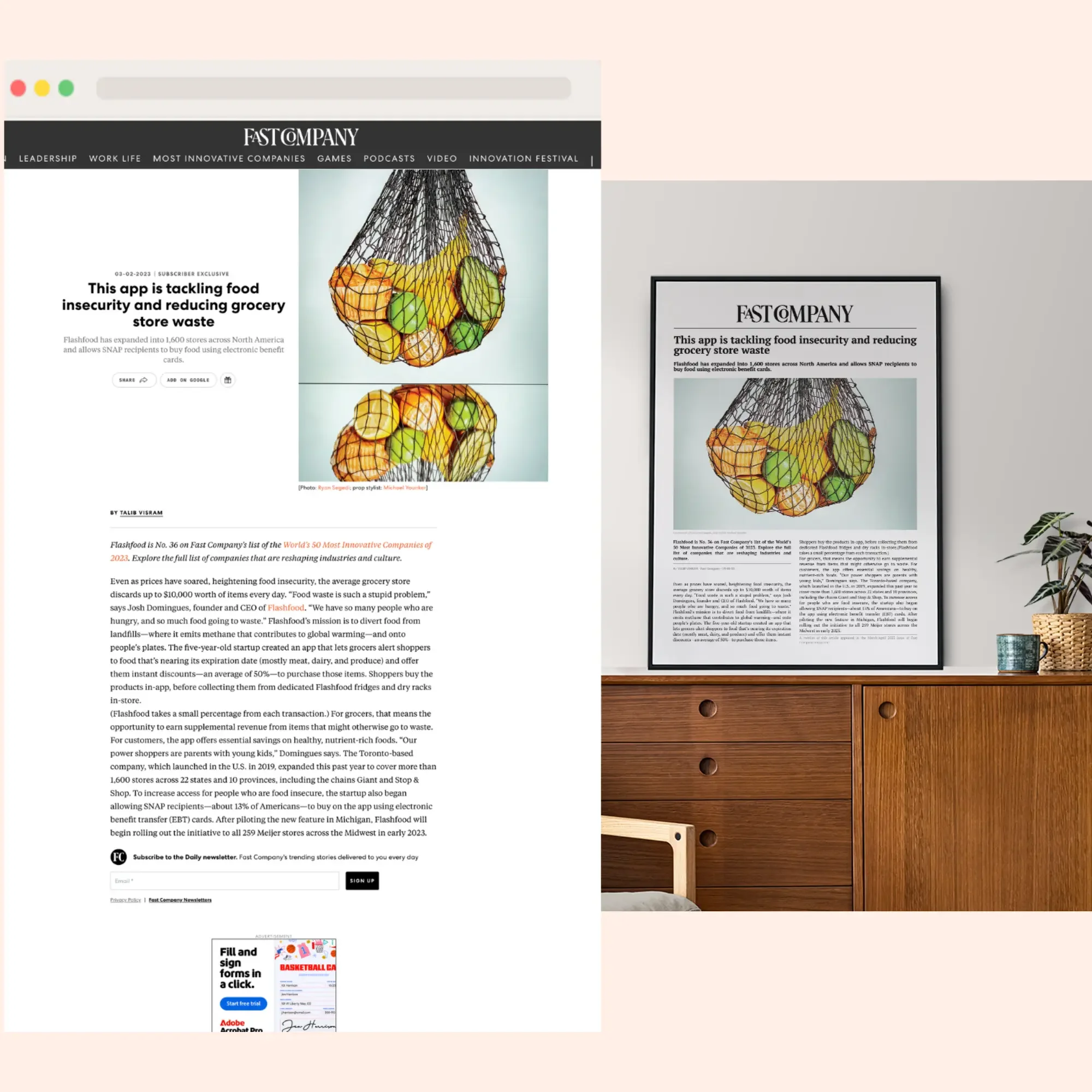
You found the article. A feature on your company, a profile of someone you love, the moment your work finally made the news. You want it on the wall (not buried in a browser tab). But there's a catch: it lives online, and online doesn't frame well.
We've rebuilt thousands of online articles into framed newspaper prints, and the process is more involved than it looks from the outside. This guide walks through how it works: what "framing an online article" really means, why the shortcut everyone tries first fails, and the two real paths from a link to a finished piece on your wall.
If you want the bigger picture on why a framed article carries so much weight, our complete guide to framing an article covers that. This one is about the how.
What does it mean to frame an online article?
A printed newspaper article is already a physical thing. You cut it out, mat it, frame it. An online article isn't. It's a web page: a headline, body text, photos, ads, menus, and a cookie banner, all built for a screen.
So framing an online article is really two jobs in one:
Reproduction. Taking the article's content (headline, byline, date, body, key images) and rebuilding it as a clean, print-ready newspaper page.
Framing. Printing that page at the right size and mounting it behind glass.
Almost everyone fixates on the framing and underestimates the reproduction. The reproduction is where the result is won or lost.
Can you just print a screenshot of an article?
The first thing most people try is a screenshot, or hitting "print" on the page. It's also the first thing we end up redoing. Here's why it doesn't hold up on a wall:
Resolution. Screens render at roughly 72–96 DPI. Print needs 300. Scale a screenshot up to frame size and the text goes soft and pixelated. It's fine on a phone, rough behind glass.
Screen clutter. Menus, sidebars, "related stories," subscribe pop-ups, cookie banners. They all ride along, and none of it belongs on your wall.
It looks like a website, not a newspaper. A screenshot keeps the site's layout. But most people framing an article want the newspaper look (masthead-style headline, columns, clean newsprint) because that reads as timeless instead of like a web page from a specific year.
Paywalls and dynamic pages. Articles behind a login, or pages that load as you scroll, often won't capture cleanly at all.
A screenshot saves the pixels. What you want is the content, rebuilt for print.
How do you turn an article link into a framed print?
There are really only two routes: do it yourself, or have it done for you. Which is right depends on how much the article matters and how much of a project you want it to be.
Doing it yourself
On paper it's a quick afternoon project. In practice it's where most people find out how much sits between a link and a finished frame. The honest version:
Extract the assets: text, photos, and the masthead. The text is the easy part. The images aren't. Web photos are compressed to load fast, so the one shot you care about usually comes off the page low-resolution and needs upscaling or enhancing before it'll survive being blown up to frame size. The newspaper's masthead is worse. Pull it straight from the site and you get a small, fuzzy version, so you end up hunting through the publication's media kit or a brand-asset library for a clean one.
Build the layout in a real design tool. That means learning enough Canva or Figma to rebuild a newspaper page from scratch. Both have free tiers, so cost isn't really the barrier. The barrier is the layout itself. Canva's newspaper templates give you a starting point, but most won't match the frame size you have in mind, so you're resizing and rebuilding regardless. Two traps to avoid. Don't do this in Word, because the layout isn't adaptive: every small change means manually moving and resizing every element all over again. And don't expect AI to rescue you. Ask a tool to generate a real publication's masthead and it'll either refuse on trademark grounds or hand back a warped approximation, and an approximate masthead is the exact tell that makes a keepsake look fake.
Match real newsprint. Column widths, fonts, spacing, a headline treatment that reads like a front page rather than a flyer. This is the line between "newspaper" and "Word doc with columns," and it's mostly taste and fiddling.
Print it properly. Export at 300 DPI, then get it to a print shop. Travel there, choose your stock, hand off the file, wait, often come back. For someone short on time, which is most people framing a career milestone, the trips are the worst part. And the paper matters more than people expect. Print on whatever's loaded and it can yellow and degrade within a year or two, so a keepsake wants stock made to last. Pro tip: buy your frame first and bring it to the printer, so you're sizing the print against the actual frame instead of a number on a website.
Frame and assemble. Mount it square, behind glass, without trapping dust or wrinkling the print.
It looks like five steps. It's really a multi-day errand with a dozen places to go sideways — the masthead stays fuzzy, the photo turns to mush at size, the free template fights your frame, the print comes back half an inch off, the paper yellows. Every one is fixable on its own. Stacked together, they're how a "quick afternoon" turns into a week of small frustrations and some swearing. If the article matters enough to frame, that's a lot riding on getting every single step right.
Having it done for you
The other route removes the design and printing problem entirely. You send the link, and it comes back reproduced as a real newspaper page, printed, framed, and ready to hang. That's what we do, and you don't send files, fight with a screenshot, or do any design work. Here's the actual sequence on our end:
You paste the URL. That's the entire intake. From the link we pull the headline, byline, publication name, date, body, and images.
A designer rebuilds it as a newspaper page. Not a screenshot, but an actual layout, with columns, a proper headline treatment, and the article's photos placed and sized to fit.
You get a proof. Before anything touches paper, you see exactly what it'll look like. Wording, layout, images, the date, all of it laid out as the finished page.
You approve it. Nothing is printed until you sign off. If a name's misspelled, a photo should be swapped, or you want a headline tweaked, this is the moment, and it costs nothing to change.
We print and frame it. Once you approve, it's printed, framed, and shipped to you ready to hang.
That proof step is the part we'd never skip. A framed article is a one-shot object — you're going to look at it for years. So the cost of catching a typo before printing is zero, and the cost of catching it after is a reprint. We'd rather you scrutinize the proof hard.
Can you frame an article that’s behind a paywall?
A couple of honest notes from doing this a few hundred times (literally).
Paywalls. If the article's behind a login and we can't reach the full text, we just ask you to paste the text and send the images directly. The newspaper layout comes out identical. The URL is the convenient path, not the only one.
Photos. Same low-resolution issue the DIY route runs into, but on our end it's a quick question rather than your afternoon. Now and then we'll ask whether you have a higher-resolution version of a key photo (a wedding shot, a headshot, a race photo), because it makes the difference between sharp and soft once it's at frame size. If you've got the original, it helps.
Magazine spreads. Magazine features often run across two facing pages. We can lay those out side by side as a single piece so the whole article reads as one, rather than forcing you to choose half of it.
Which articles are worth framing?
Almost any article works, but a few come up again and again:
Career and business milestones. A feature on your company, a founder profile, an award write-up. A lot of what we make ends up on office walls or given as gifts: a promotion gift, or a retirement gift for someone who spent decades earning that headline.
Personal achievements. A marathon, a graduation, your kid's name in the paper for winning the regional tournament, the local story about something you pulled off.
Someone you're proud of. A partner, parent, or friend who got written about, turned into a gift they'd never buy for themselves.
Legacy and family history. An article about a relative, or a historic story tied to your family, preserved instead of lost in a link that may not exist in ten years.
That last point is worth sitting with. Links rot. Sites redesign, articles get pulled, publications fold. A framed print is the version that's still there in twenty years.
Ready to put it on the wall?
If you've got the link, you've got everything you need to start. Begin your framed article. You send the URL, we handle the reproduction, the printing, and the framing, and nothing prints until you approve the proof.
About the author:
Alex Couture, co-founder of Yourframedarticle.
Through the years I've learned that running a business is daunting: the highs are high, the lows are low, and celebrating every win is what builds the foundation for the next one. That belief became our mission. My team and I have turned hundreds of online articles, newspaper clippings, and magazine features into framed keepsakes, a mix of art and motivation on the wall, built not just to look good but to build confidence and remind their owners of what they're capable of. And we don't print a thing until the proof is exactly right.